


.jpg)
.jpg)


 СН4 мал 200.jpg)



If your OSTEN gas meter shuts off, start by checking the display and account balance. A blank screen, a closed valve, and a connection error require different actions. Below are reopening instructions for two configurations and explanations of display messages.
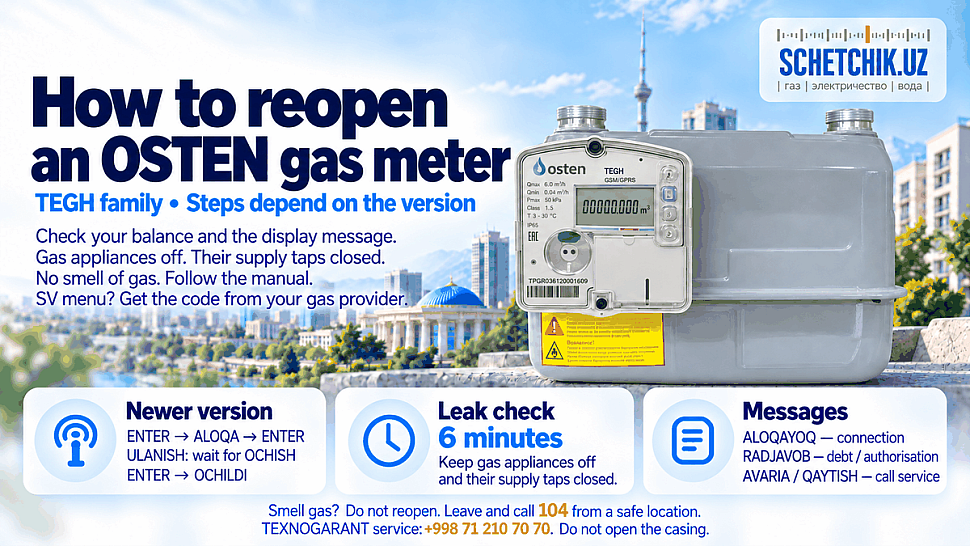
What to do before reopening OSTEN
If you smell gas, do not attempt to open the valve. Do not use flames or switch electrical appliances on or off. Ventilate if safe. Leave the hazardous area and call 104 from a safe location.
If there is no gas smell:
- Turn off your cooker, boiler, and other gas appliances.
- Close the appliances’ gas taps.
- Press ENTER and record the display message.
- Check your balance and whether the latest payment was credited.
- Compare your meter’s menus with the instructions below.
These procedures apply to electronic diaphragm meters in the OSTEN TEGH family. The G4 or G6 designation alone does not identify the menu configuration.
Why the meter may stop supplying gas
The internal valve may close following a remote command, detected interference, or critically low battery charge. If the account is in debt, check payment and reopening authorisation.
A blank display does not always mean disconnection: the screen enters sleep mode. Try activating it with ENTER. If it does not respond, contact the service centre.
How to reopen the newer OSTEN configuration
Use this procedure if the meter has ALOQA, ULANISH, and OCHISH menus. Prepare gas appliances and taps strictly according to the installation manual. If the main tap’s purpose is unclear, ask the gas service for guidance.
| Step | Action | Result |
|---|---|---|
| 1 | Press ENTER. | ALOQA |
| 2 | Press ENTER again. | ULANISH |
| 3 | Wait for the connection. | OCHISH |
| 4 | Press ENTER to open. | Valve opening begins. |
| 5 | Wait for confirmation. | OCHILDI, followed by readings. |
For this configuration, the manufacturer specifies opening approximately 10 seconds after the command. Watch the screen and wait for connection between presses.
Do not use gas appliances immediately: the manual requires a six-minute leak-tightness check. Gas consumption during the check causes blocking.
How to reopen the older password-based configuration
- Use the up and down buttons to find SV.
- If VAL 20 appears, press ENTER and select UP PSSd.
- Open PUD 0 and enter the four-digit password issued by the data processing centre after the debt has been cleared.
- Successful confirmation produces VAL 40.
- Select UP OPEN and press ENTER to confirm opening.
VAL 40 means password-free opening mode, not confirmation that the valve is open. Obtain the code for your device through the service provider.
OSTEN error messages
| Message | Meaning | Action |
|---|---|---|
| ALOQAYOQ | Connection error. | Request a connection check. |
| RADJAVOB | Outstanding debt and/or no opening command received. | Check payment and authorisation. |
| AVARIA | A problem during valve opening. | Stop attempts and contact a technician. |
| QAYTISH | Three unsuccessful opening attempts. | Contact the gas service or service centre. |
This table applies to the newer configuration. AVARIA alone does not identify the exact fault.
Payment completed, but gas has not returned
Check the account number and payment status on your receipt. Ask your service provider to verify that payment was credited, reopening was authorised, and whether a password is required. Have the model, serial number, display photograph, and receipt ready.
For OSTEN diagnostics, contact the official TEXNOGARANT service centre at +998 71 210 70 70. If you smell gas, call 104.
❓ Frequently Asked Questions About OSTEN Gas Meter Shut-Off
Click or tap a question to reveal the answer ↓
What should I check first if my OSTEN meter stops supplying gas?
First check whether there is a gas smell. If there is, leave the hazardous area and call 104 from a safe location. Do not attempt to reopen the meter, use flames or operate electrical switches. If there is no gas smell, turn off gas appliances, close their gas taps, record the display message and check your account balance.
How can I check whether a blank display is simply asleep?
Press ENTER to wake the display. The screen may switch off to save battery power, so a blank screen alone does not confirm that the gas supply has been disconnected. If it remains unresponsive, arrange diagnostics through the service centre without opening the meter.
How do I identify the correct reopening instructions?
Match the instructions to your meter’s menus. The newer configuration uses ALOQA, ULANISH and OCHISH. The older password-based configuration uses menus such as SV, VAL 20 and UP PSSd. G4 or G6 alone does not identify the configuration; follow the official instructions for your exact device.
How should I use ENTER on the newer configuration?
Follow each menu stage and wait for the connection between commands. The article describes the sequence ALOQA → ULANISH → OCHISH, with OCHILDI confirming opening. Three rapid button presses do not replace the procedure. Prepare appliances and taps exactly as required by the manufacturer’s instructions.
Where do I obtain a password for the older configuration?
Obtain the device-specific password through your gas service provider or its data processing centre after the debt has been cleared. Have your account number and meter details ready. Use the official procedure for your configuration rather than trying guessed codes.
What does VAL 40 mean?
VAL 40 indicates password-free opening mode in the older configuration. It does not confirm that the valve is already open. Continue only according to the official instructions for that configuration.
What should I check after paying an outstanding balance?
Check that the payment reached the correct account and that reopening has been authorised. Keep the receipt ready. If gas has not returned, ask your provider to verify the credited payment, the opening authorisation and whether your meter requires a password.
When can I use gas appliances after the valve opens?
Wait until the manufacturer’s required leak-tightness check has finished successfully. For the newer configuration described in the article, this check lasts six minutes and requires no gas consumption. If an error appears or the valve closes again, stop and contact the gas service before using appliances.
What information helps resolve a recurring error?
Prepare a clear display photograph, the meter model and serial number, your account number and any payment receipt. Record which actions you took. For AVARIA or QAYTISH, stop reopening attempts and contact the gas service or service centre. Do not force the valve or break seals.
Who can diagnose a battery or meter fault?
An authorised service centre can diagnose the fault and arrange the necessary work. The article lists TEXNOGARANT at +998 71 210 70 70 for OSTEN diagnostics. Battery replacement involving sealed parts must be handled by authorised personnel. For a gas smell, call 104 from a safe location.


0 comments