


.jpg)
.jpg)


 СН4 мал 200.jpg)



Updated: 11 October 2026.
Not every customer needs to submit gas meter readings manually. A meter connected to the automated gas monitoring and metering system, known as ASKUG, transmits data automatically. For meters outside this system, Hududgazta’minot has provided the @hgt_abonent_bot Telegram bot.
Key point: submitting a reading, checking your balance and making a payment are separate actions. Paying for gas does not, by itself, confirm that a new reading has reached the system.
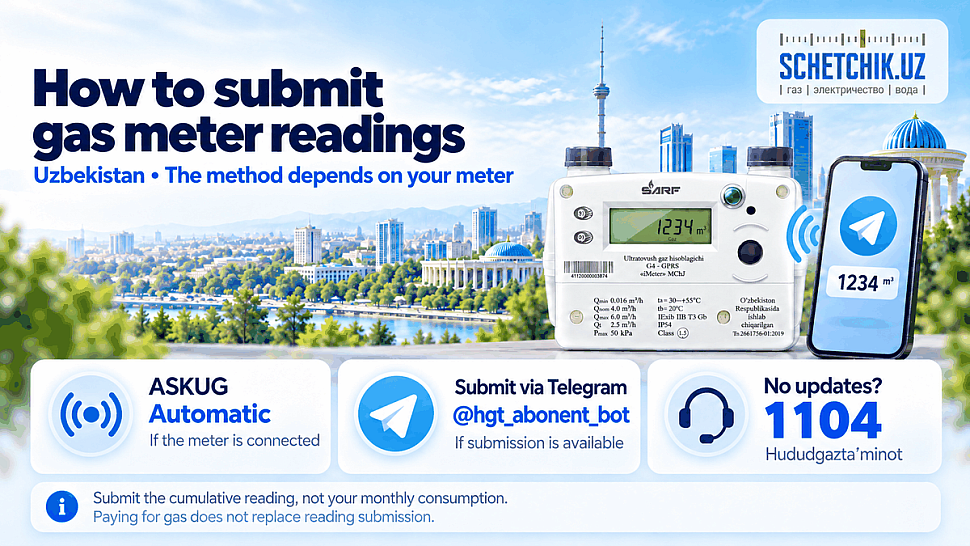
📋 Which method applies to your meter?
| Situation | What to do |
|---|---|
| The meter is connected to ASKUG and data is updating | Monitor readings and charges through the provider’s services. |
| The meter is not connected to ASKUG | Use @hgt_abonent_bot if reading submission is available for your account. |
| Automatic readings have stopped updating | Record the reading and contact Hududgazta’minot on 1104. |
| The bot rejects the reading or cannot find your account | Ask 1104 or your district gas office how to submit it. |
A digital display or modem does not, on its own, prove that the meter is registered in the provider’s system and transmitting successfully. Ask your provider if you are unsure about its connection status.
How to read your meter correctly
- Find the cumulative gas volume in m³. On a digital meter, do not confuse it with the balance, date or an error code.
- Photograph the reading and record the date.
- Prepare the customer account number from your contract or bill. The meter’s serial number is a different identifier.
- Use the format required by the service. If it accepts whole cubic metres only, enter the digits before the decimal separator without rounding up.
Example: the meter displays 001234.567 m³. If the form accepts whole cubic metres only, enter 1234. Do not enter 1234567, which would greatly overstate the reading.
Submit the cumulative reading unless the form explicitly asks for consumption. For example, the difference between 1,210 and 1,234 m³ is 24 m³, but the current-reading field requires 1,234.
📲 Submitting through the Telegram bot
- Open @hgt_abonent_bot and start it.
- Follow the bot’s registration instructions.
- Add or select your customer account. Check the address and customer details.
- If reading submission is available for your account, open the relevant menu option.
- Enter the current reading, check the digits and confirm submission.
- Save the bot’s response. Then check whether the new reading appears in your account information.
Button names may change. If no reading-entry option is available, do not enter the reading in a payment field. Ask your provider which submission method is available.
Customer account and offline assistance
Access the customer account using the link on the official Hududgazta’minot website. Check the latest reading date and billing period: readings taken on different days may differ.
Without internet access, call 1104 or visit your district gas office. Ask how readings are accepted for your particular account. Have your address, account number, meter reading and reading date ready.
If something goes wrong
If you enter an incorrect value, data stops updating or charges do not match your records, keep the meter photograph and submission confirmation. Ask the provider to check the meter’s account assignment, the latest accepted reading and the calculation for the disputed period. Keep your enquiry reference number.
Do not open the meter, damage its seals or change communication settings yourself. If you smell gas, move to a safe location and call the gas emergency service on 104.
❓ Frequently Asked Questions About Submitting Gas Meter Readings
Click or tap a question to reveal the answer ↓
How can I check whether my meter sends readings automatically?
Check whether recent readings and their dates are updating in your provider’s account services. A meter registered in ASKUG, the automated gas monitoring and metering system, can transmit readings automatically. A digital display or modem alone does not confirm a working connection.
What information should I prepare before submitting a reading?
Prepare your customer account number, the current cumulative reading in cubic metres (m³), the reading date and a clear meter photograph. Check the address associated with the account before confirming submission.
Should I submit the total reading or the gas used this month?
Enter the cumulative meter reading in the current-reading field. For example, if the reading has increased from 1,210 to 1,234 m³, enter 1,234. The difference of 24 m³ is consumption; enter it only if the form specifically requests consumption.
Which digits should I enter if the form accepts whole cubic metres only?
Enter the digits before the decimal separator without rounding up. For a display reading of 001234.567 m³, enter 1234. Follow the service’s format if it accepts decimal readings, and check every digit before submitting.
Where do I find my customer account number?
Use the customer account number shown on your gas supply contract or bill. It identifies your billing account. The meter’s serial number identifies the physical device and should not be substituted for the account number.
How can I submit a reading through Telegram?
Open @hgt_abonent_bot, follow registration instructions and select your account. If reading submission is available, enter the current reading in the relevant menu and confirm it. Save the response. If the option is unavailable, contact 1104 for the submission method supported for your account.
How do I confirm that my reading was accepted?
Save the submission confirmation and check the latest accepted reading and date in your account. Compare them with your photograph. Check payment crediting separately: a successful payment does not by itself confirm acceptance of a new meter reading.
What should I do if automatic readings stop updating?
Photograph the current reading, record the date and contact Hududgazta’minot on 1104. Ask for a check of communications and the meter’s assignment to your account. Keep your enquiry reference number and leave the meter’s seals and communication settings intact.
How can I correct a reading submitted incorrectly?
Notify the provider promptly and supply the correct reading, date and meter photograph. Include the submission confirmation and account number. Request a correction through the provider rather than submitting guessed replacement values.
How can I arrange submission without internet access?
Call 1104 or visit your district gas office to arrange the method available for your account. Have your address, account number, current reading and reading date ready. Follow the provider’s instructions for the submission date and retain any confirmation.
Current rates are covered in the Uzbekistan gas tariffs article. Browse models in the gas meter catalogue; confirm compatibility with the provider’s system before purchasing.
#SchetchikUz #GasMeter #MeterReadings #Hududgaz #ASKUG #Uzbekistan #GasMetering


0 comments