

.jpg)
.jpg)


 СН4 мал 200.jpg)


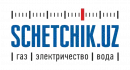
Updated on 11 October 2026. If gas stops flowing through a SARF meter, first establish the cause. Your account balance, the meter valve and the network gas supply are separate issues. Pressing the button cannot resolve every interruption.
The procedure below is based on the manufacturer’s passport for SARF GPRS RF K meters. For another version, follow its own manual or the gas supplier’s instructions.
Do not restart the meter if you smell gas
If you smell gas or suspect a leak: do not use flames or operate electrical switches or appliances. If safe, shut off the gas and open doors and windows. Leave the premises and call the gas emergency service on 104 from a safe location.
Do not attempt to open the meter valve. Resume gas use after specialists have checked the situation.
Checks before restarting a SARF meter
- Check your balance. If you owe money, pay and verify that the payment reached your correct gas account. Keep the receipt.
- Establish the interruption’s cause. The meter button cannot restore the network supply during repairs or a wider outage.
- Turn off all gas appliances. Close the supply taps serving the cooker, boiler and other appliances downstream of the meter.
- Check the display. Record or photograph any message or code.
Do not turn a tap if you are unsure what it controls. Closing and reopening the inlet tap upstream of the meter should not be treated as a required step for every SARF model.
How to confirm opening of the SARF valve
Use this sequence only when there is no gas smell, the interruption’s cause has been resolved and the procedure matches your model’s manual:
- If the display is inactive, briefly press the control button.
- Hold the button for approximately 3 seconds until ERROR-28 appears.
- Briefly press the button again to confirm opening.
- Wait approximately 10 minutes. Keep appliance supply taps closed and do not operate gas appliances during the check.
- Verify successful completion using the displayed valve status and the manual’s instructions. Then operate the appliance according to its own instructions.
If gas does not flow or the valve closes again, do not keep repeating the restart. Record the message and contact the gas service.
What does ERROR-28 mean?
In the manufacturer’s passport, ERROR-28 indicates that confirmation to open the valve is required. The message alone does not mean that the meter is faulty.
Do not automatically apply the ERROR-28 procedure to another code. Check its meaning in the manual for your specific version or ask the service team.
What to do if the meter will not restart
| Situation | Next action |
|---|---|
| Payment made, balance unchanged | Check the account number and payment status; contact 1104 with the receipt. |
| The display does not respond to the button | Do not open the casing; request a specialist’s inspection. |
| The valve closes again or another code appears | Stop the restart; report the code and model to the gas service. |
| The valve appears open but there is no gas | Ask the gas service about the network supply. |
| You smell gas | Leave the premises and call 104 from a safe location. |
Who to contact
- 1104 — Hududgaztaʼminot: account balance, payments and enquiries.
- 104 — gas leaks, emergencies and technical supply problems.
- Official SARF documentation — model passports and technical information.
Prepare your address, gas account number, meter model, serial number, displayed message and payment receipt if relevant. Keep the enquiry reference number.
❓ Frequently Asked Questions About Restarting a SARF Gas Meter
Click or tap a question to reveal the answer ↓
What should I check before restarting a SARF meter?
First check for a gas smell. If you smell gas, leave the premises and call 104 from a safe location. Do not attempt a restart, use flames or operate electrical switches. If there is no gas smell, check your balance, payment status, display message and whether there is a network supply interruption. Turn off gas appliances and close their supply taps before following the correct manual.
Which SARF meters does the article’s procedure cover?
The procedure is based on the manufacturer’s documentation for SARF GPRS RF K meters. Match your meter’s version and display messages to its own manual before proceeding. Other SARF versions may require a different sequence.
What does ERROR-28 mean?
In the documentation used for this article, ERROR-28 means that confirmation to open the valve is required. The message alone does not establish a meter fault. Follow the confirmation procedure only when it matches your model’s manual, there is no gas smell and the cause of the interruption has been resolved.
What should I do during the check after confirming valve opening?
Keep gas appliances off and their supply taps closed. The procedure described in the article requires approximately 10 minutes of waiting. Confirm successful completion using the displayed valve status and your model’s manual before operating an appliance according to its own instructions.
What should I check if gas has not returned after payment?
Verify that the payment was credited to the correct gas account. Keep the receipt and check the transaction status. If your balance is updated but supply has not returned, contact 1104 to clarify the account status and next steps. Payment, valve status and network gas availability are separate checks.
What if the valve appears open but there is still no gas?
Ask the gas service to check the network supply. The meter’s button cannot restore gas during a wider outage or network repairs. Report the displayed valve status and your address so the service team can investigate the interruption.
What should I do if the valve closes again or another error appears?
Stop restarting and record the exact message. Photograph the display and report the model, serial number and actions already taken to the gas service. Use the instructions for that specific error rather than applying the ERROR-28 procedure to every code.
How should I handle an unresponsive display?
Request an inspection if the display does not respond to the control button. A blank screen alone does not confirm a depleted battery. Keep the casing and seals intact; an authorised specialist should diagnose the power source and arrange any necessary work.
How can I find out whether the meter needs replacing?
Arrange diagnostics before buying a replacement. Interrupted gas supply can be related to the account, network or valve status rather than a failed meter. If replacement is necessary, agree the suitable model and installation procedure with your gas supplier.
What information should I prepare when contacting support?
Prepare your address, gas account number, meter model, serial number, display photograph and payment receipt if relevant. Contact 1104 for account and payment enquiries. For a gas smell or suspected leak, leave the premises and call 104 from a safe location. Keep the enquiry reference number for follow-up.
Sources: SARF manufacturer documentation, Hududgaztaʼminot’s official notice, and Emergency Ministry safety guidance.
Hashtags: #SchetchikUz #Sarf #GasMeter #Error28 #GasSafety #Hududgaz


0 comments